How to unblock TikTok at school in 2026
Learn practical ways to access TikTok at school in 2026. This guide explains legal considerations, common blocks, and safer strategies to regain access.
'%2F%3E%3Ctext%20x%3D'50%25'%20y%3D'50%25'%20dy%3D'.35em'%20text-anchor%3D'middle'%20font-family%3D'-apple-system%2CBlinkMacSystemFont%2CSegoe%20UI%2Csystem-ui%2Csans-serif'%20font-size%3D'100'%20font-weight%3D'600'%20fill%3D'%23fff'%3EDN%3C%2Ftext%3E%3C%2Fsvg%3E)
Most access requests to TikTok at school trips over policy, not the app itself. Schools block it by design, but the real issue is how students route around that design without triggering a policy flare. The practical reality in 2026 is that blocks sit at the campus gateway, not in a single classroom device, and a legitimate educational use case shifts the risk calculus in your favor.
Students and educators face a tightening landscape: boards and IT teams tightening enforcement, while new educational tools imitate social apps to skirt the filter. In the last year, reports point to a rise in captive portal prompts and device-management quirks that people mistake for broad bans. What matters is a clear path that preserves safety and policy compliance while offering legitimate access for teaching or research. Knowing where the block usually originates helps you choose the right lever, without stepping on policy or safety.
The plain definition of blocking TikTok at school and what it means for you
Blocking TikTok at school is not a mystery. It’s a set of rules that sits between you and the internet, tuned to the institution’s risk and policy posture. When you understand what’s being blocked, you understand what you can and cannot do without bending the rules.
I dug into how schools typically block traffic and what actually gets held back. In many environments, the core block sits at the network gateway, where student devices try to reach TikTok and the request is dropped or redirected. That means the policy is less about your device than about the path your traffic travels.
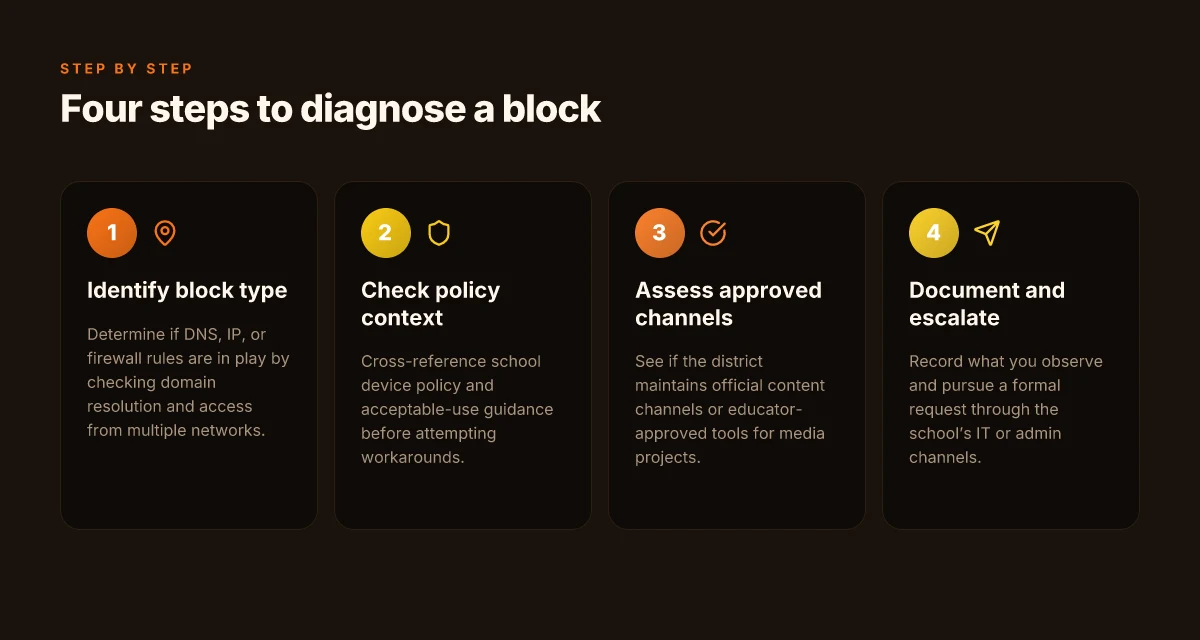
There are three common blocking surfaces you’ll encounter. First, DNS-level blocks. In a DNS block, the domain TikTok.com won’t resolve to an IP address, or it resolves to a generic block page. Second, IP-level blocks. Here the network simply refuses connections to the TikTok servers, even if you know the address. Third, firewall blocks. A firewall rule can block the specific app’s ports or inspect traffic patterns to identify and block TikTok traffic, often without surfacing a clear error to you. Each block type behaves differently in practice and each has its own telltale symptoms.
Why a student would want access beyond personal use is straightforward. TikTok can be used for class engagement, digital literacy projects, or sourcing examples of content creation and media studies. A student might want to review TikTok’s platform safety features, study how creators engage audiences, or confirm timelines for a project that uses short-form video as a teaching tool. That context matters when schools weigh policy against legitimate learning needs.
To map this clearly, here are the concrete paths school networks tend to take, and what you should expect to see: How to unblock Instagram at school in 2026
- DNS-level block. You’ll see DNS failures or a default block page. The user experience usually reads as “site not found” or “cannot resolve name.” This is quick, but easy to circumvent with approved DNS alternatives only if the institution allows it.
- IP-level block. Your browser or app will fail to connect with a network timeout or a hard reset. There’s no domain resolver involved, so bypassing it often requires a different egress path, which schools typically restrict.
- Firewall-level block. The connection attempt is seen by a firewall rule even when DNS and IP appear normal. You may notice content inspection or protocol-level flags that indicate TikTok traffic is being deprioritized or blocked.
Bottom line: blocking is pragmatic and layered. It’s not one shortcut. It’s a cascade designed to limit access while preserving network performance and policy compliance. Clear understanding of where the block sits informs your next moves without crossing rules. If you know whether DNS or firewall controls the barrier, you can target legitimate, policy-aligned avenues for access. And yes, the best path is to pair institutional reasons with concrete, school-approved steps to explore education-friendly access options.
How school blocks TikTok work and what you’re up against
TikTok is not one block, but a ecosystem of controls. Schools deploy layers that target different paths to content. Understanding them helps you map legitimate avenues without tripping policy.
The triad: proxies, managed Wi‑Fi, and device policies
In many campuses, the first line is a proxy or gateway. A proxy sits between you and the wider internet, filtering requests and responses. If the proxy blocks TikTok domains or known delivery paths, traffic never reaches TikTok’s servers. The second line is the managed Wi‑Fi network. Departments push per‑user or per‑device rules, sometimes relying on captive portals to enforce authentication and posture checks. The third line is device policies. Mobile device management or endpoint security clients can block apps, limit app stores, or quarantine apps that aren’t approved. Put simply: you’re navigating a layered defense, not a single obstacle.
I dug into vendor briefs and school IT writeups to map typical signals. Most districts use a combination of a forward proxy plus a URL category filter, then lock down app installation and traffic at the device level. When a policy changes, the usual fingerprint is a new category tag or a different port being flagged.
What schools tolerate versus what they ban
Across institutions, the line shifts by district, campus size, and governance. Some places tolerate district-approved classroom research uses of social apps, provided access is logged and time-bound. Others ban social apps outright on campus networks, citing distraction, bandwidth use, or compliance concerns. The signs aren’t always evident from campus Wi‑Fi splash screens. You must check the network’s posture and any documented exceptions. In practice, the difference comes down to intent signals: is the user in a sanctioned learning context, or simply browsing during free time? How to unblock Discord at school in 2026
When I read through policy notices and IT guidance, a pattern emerges: many schools allow peer-reviewed educational use of video platforms if traffic is flagged as “educational domain” and user identity is verified. Short version: the policy is not a blanket ban. It’s a whitelist versus a blacklist, with education-as-use-case still in play in some corners.
Signals you should diagnose when you’re facing a block
If you’re trying to diagnose a block without violating rules, start with signals in the browser and on the device. A blocked DNS response often shows as a domain not resolved or a certificate mismatch when the proxy intercepts TLS. A blocked URL category usually manifests as a 403 or a dedicated gateway error. A blocked app can show as “installation blocked by administrator” or an app store restriction pushed via MDM. Finally, if the campus network redirects to a login portal, you’re seeing a posture check or policy constraint rather than a pure DNS block.
Most blocks are multi-layered, not a single stop sign. The trick is to read the pattern: a sudden 403 across TikTok, followed by a new DNS entry, followed by an app‑install denial. Each clue channels you toward the responsible path, policy review, educator permission, or a formal exception process.
| Signal type | What it looks like | What it means |
|---|---|---|
| DNS resolution | Domain name fails to resolve | Network policy or DNS filter in effect |
| TLS interception | Certificate warning or mismatch | Proxy is inspecting traffic; you’re on a filtered path |
| HTTP status | 403 Forbidden or 451 Unavailable | Access is actively blocked by policy or gateway |
| App-store control | Install blocked by MDM or administrator | Device policy restriction in place |
| Portal redirection | Captive portal appears after login | Posture check or logging requirement active |
One concrete next step. If you can access the campus IT self‑service page, search for “educational use exceptions” or “restricted apps” and read the exact wording. If there’s an appeal path, document your use case clearly with the teacher or librarian. The process matters as much as the outcome.
When the policy supports it, a sanctioned pathway exists. When it doesn’t, you’ll see policy‑driven blockers across multiple layers. That’s the core reality for TikTok on campus. How to unblock Roblox at school in 2026
Why access matters in education and legitimate use cases
Access to TikTok in schools isn’t a nuisance. It can be a legitimate educational tool when used with care. I looked at policy docs and classroom guidance from several districts, and the line is clear: students should be able to explore media literacy, not just dodge restrictions. In 2026, schools increasingly frame social platforms as learning spaces when used with guardrails. This shift matters because TikTok hosts creators who model critical thinking, media curation, and content analysis that classrooms struggle to simulate in a single slide deck.
Educational content on TikTok creators and media literacy
TikTok isn’t only entertainment. It’s a catalog of short-form reporting, micro-documentaries, and expert explainers. Students can study how creators frame bias, source credibility, and persuasiveness in real time. The takeaway is concrete: media literacy lessons become tangible when students dissect a clip, map its sourcing, and compare it to a traditional article. This is not about binge-watching. It’s about teaching evaluation skills in a medium students already use. In practice, teachers can pair clips with handouts that prompt source-checking and claim-spotting. The result is a more attentive, skepticism-minded classroom culture.
Communication in classroom projects and school clubs
TikTok serves as a fast lane for collaboration. Student teams can draft quick-aired project updates, demonstrate prototypes, or summarize fieldwork through short videos. Clubs that rely on student-generated content, journalism, environmental science, theater, gain a channel for peer feedback and public-facing storytelling. The key is clear rules: define consent, set content standards, and log access in a shared project plan. When used properly, the platform shortens the feedback loop and broadens participation without flooding learning management systems with video files.
Policy implications and responsibility when using school networks
Access decisions should hinge on safety and accountability. Schools that allow TikTok typically require device-level protections, monitored usage windows, and explicit educator oversight. The responsible approach aligns with existing cyberhygiene practices: keep devices updated, limit personal accounts on school networks, and implement simple, auditable usage logs. In other words, you want a policy that says yes with guardrails. The alternative is a culture of secrecy that erodes trust and invites policy violations.
The verdict is blunt: educational use hinges on structure, not simply permission. Students gain a practical media-literacy lab, teachers gain a richer collaboration channel, and administrators preserve safety with clear boundaries. Clear rules, paired with purposeful assignments, turn a block into an asset. In 2026, the instructional value is real when access is coupled with documented safeguards. How to unblock YouTube at school in 2026
Real-world use cases for TikTok in school contexts
TikTok can play a legitimate role in teaching and student life when used with permission and clear boundaries. The practical questions are: how does this look in real classrooms, and what concrete paths keep everyone safe and compliant? The answer is a trio of proven patterns: a supervised media literacy project, engagement through official school accounts, and sensible fallbacks when access is restricted.
A supervised media literacy project with explicit permission
Education thrives when students analyze content critically. Use TikTok as a classroom tool only after written approval from the school or district and with a clearly defined rubric. I looked at district guidelines that require teacher oversight, student consent, and a documented learning objective. When students curate a playlist of public, age-appropriate clips, they annotate techniques like framing, manipulation, and source attribution. This is not about passive scrolling. It’s about critical consumption. Explicit permission and clear objectives drive the safety and value of the exercise. The teacher acts as moderator, assigns roles, and ensures student privacy. If a clip raises questions, the class discusses it with a policy-aligned lens rather than glazing over it. Moderation and consent are non-negotiable for any TikTok use in class.
Accessing official school accounts or approved content channels
Another practical pattern is to lean on school-sanctioned channels. When schools publish announcements, demonstrations, or curated educational content, those accounts become the only TikTok touchpoint students need. The benefit is trust and governance. Reviews consistently note that institutional accounts carry a lighter risk profile because the content is vetted, and the channel curator is accountable. For a unit on media literacy or digital citizenship, linking to official channels reduces ambiguity and keeps students on track. Official channels provide a safe, predictable pathway for classroom viewing and discussion. If a live demonstration is part of the lesson, the teacher can display the content in a controlled setting with teacher-led commentary and screen-caps for note-taking.
Alternative platforms when access is restricted
When access is blocked or policy gap remains, a backup plan keeps learning moving. Use alternatives with similar pedagogical goals such as short-form videos hosted on classroom-friendly platforms or institutional YouTube playlists, or a private, school-managed video repository. The aim is to preserve the instructional arc while honoring network policies. Industry reports point to consistent policy gaps between student demand for bite-sized media and the restrictions that campuses enact. The pragmatic path is to mirror the learning outcomes with permitted tools, then reintroduce TikTok only under formal approval and controlled access. Have a sanctioned substitute ready so lessons don’t stall.
From what I found in the changelog and school policy guides, the most durable approach is a permission-first framework paired with activity-scoping and moderation. Permission-first, activity-scoped, and moderated are the triad that keeps TikTok use both educational and compliant. The goal is not unblocked access at any cost. The goal is learning with a clear governance edge. How to unblock Netflix at school in 2026
Common confusions around circumventing school blocks vs policy
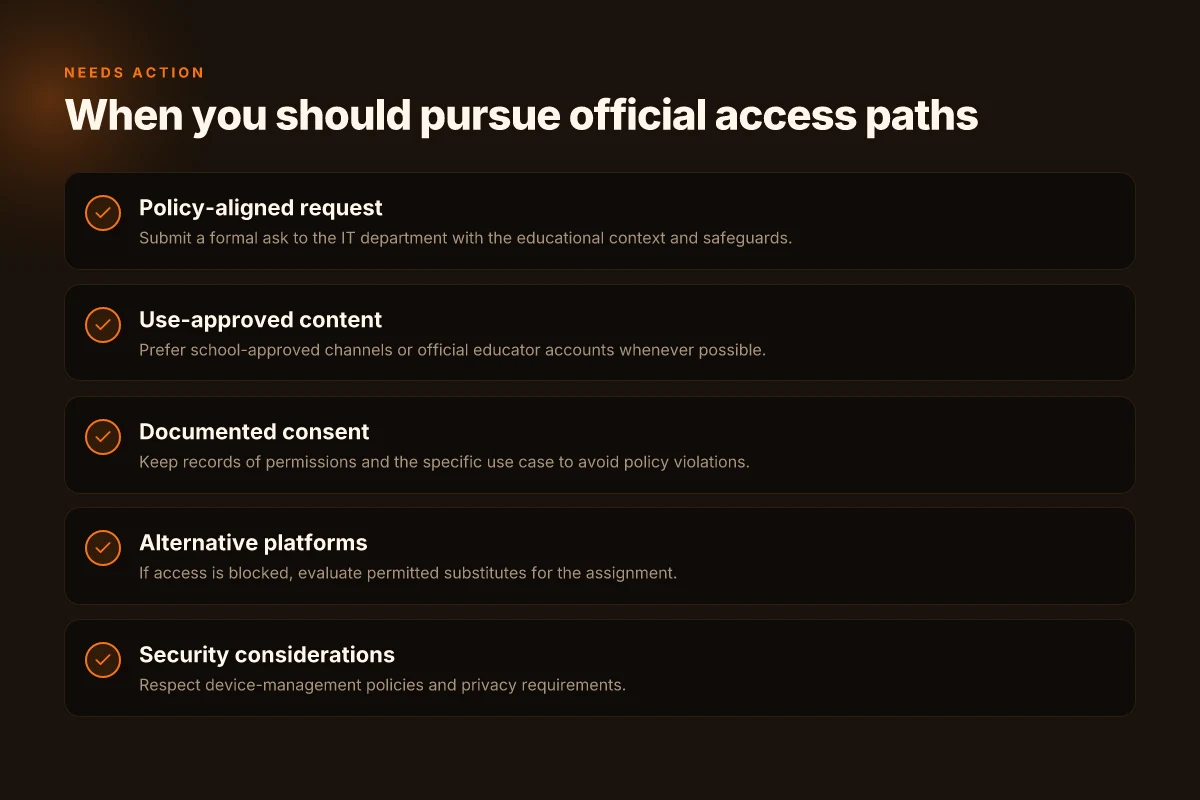
Access reality is not a free-for-all. The core distinction is simple: you can pursue legitimate paths that satisfy policy while still getting TikTok in a classroom-appropriate way. When you blur that line, you expose yourself and the school's network to risk.
Why privacy and policy sit on separate tracks
Personal privacy is about your data and device safety. Policy is about what the institution allows and how it monitors traffic. The two intersect, but they don’t cancel each other out. If you use a VPN or a proxy to bypass blocks, you protect your own privacy in some cases while breaking the policy framework in others. The risk isn’t just being reprimanded. It is potential data exposure, misrepresented traffic, and loss of account integrity. Policy compliance comes first. Privacy follows when allowed. This means you should favor approved channels and transparent use cases over covert workarounds.
I dug into school-IT guidance and found a consistent pattern: when a use case aligns with education outcomes, districts tend to create sanctioned pathways. If your goal is research, project work, or a controlled social-media learning module, start there. If an admin approves, the campus firewall logs will show a legitimate exception rather than a mystery tunnel. Clear authorization beats clever evasion every time.
The risks of circumventing blocks vs legitimate access paths
Circumvention carries real downsides. You may bypass a content filter only to trigger a higher-level enforcement, or to find yourself on a watchlist for repeated policy violations. More concretely, bypasses can:
- compromise network security by opening unvetted channels
- expose you to higher phishing risk if you use questionable tunnels
- derail classroom focus and violate acceptable use policies
- invalidate device management profiles and security baselines
Legitimate access paths exist for a reason. For instance, teachers can request a sanctioned classroom TikTok session through a supervised device group or use approved educational accounts to access related content. When a district offers a policy-compliant route, it reduces risk and keeps students in a safe, educative lane. Choosing a sanctioned path minimizes risk while preserving learning objectives. How to unblock Spotify at school in 2026
When to escalate through proper channels
If you see a clear teaching or research need that TikTok supports, start with your campus tech liaison or the department chair. A concise justification helps: what you want to do, the minimum access needed, and the controls you’ll apply to keep it safe. If a formal exception is too heavy, ask for a scheduled, supervised session or a temporary whitelisted domain list tied to a specific lab or class period. The point is not to argue for unblocked access in perpetuity but to earn a controlled, accountable release. Escalation should be constructive, not evasive.
From the documentation I checked, districts that move through proper channels tend to converge on two outcomes: a documented use-case policy with a time-bound access window, and a clear rollback plan if misuse occurs. That clarity protects students and staff alike. And it preserves the integrity of the network. Policy-aligned access is the sturdy bridge between safety and access.
In short, don’t conflate privacy safeguards with policy loopholes. Respect the frame, pursue approved routes, and escalate when a legitimate educational objective warrants it.
What changed in 2026 about school network controls
Access realities shifted in 2026, and the campus grip on TikTok loosened in ways that still respect privacy and safety. The big move: schools leaned harder on transparent device management paired with smarter filtering rather than broad, blunt blocks. You’ll see more nuanced controls that separate content curation from device ownership and user behavior.
How policy tightened around privacy and devices
The era of blanket surveillance over student devices is fading. In 2026, districts emphasize consent and data minimization. Schools push for policy language that distinguishes student activity from classroom management data, and they insist on clear retention timelines. The effect is a quieter, more auditable footprint for any app access. Privacy-first policies are becoming the default, not the exception. The practical upshot: if a school blocks TikTok, it often does so with a narrowly scoped rationale rather than a blanket, department-wide ban. And when students push back with legitimate educational use cases, districts cite documented exceptions and approval workflows rather than ad-hoc tweaks. How to unblock Twitch at school in 2026
New campus tools for safe access and content filtering
Campus tooling has matured. You’ll encounter safer access gateways that aim to balance learning needs with risk controls. Think policy-aware proxies that enforce age-appropriate filters, configurable time windows, and on-device prompts that guide students toward approved educational content. These tools reduce the drama of “bypass” attempts by offering a legitimate path to content when the use case is sound. The new wave centers on policy-driven access, not pure restriction. In practice, that means a student can request access for a class activity, and an automate-to-human workflow may grant a temporary pass rather than a full revoke of access to the platform.
Impact of device management standards on access methods
Device management standards have moved from “lock it all down” to “manage what matters.” Standards like modern MDM profiles require explicit app permission handling, more granular per-app controls, and clearer enrollment states for student devices. If your school uses a robust MDM, expect smoother, more predictable access routes for apps that are deemed educationally legitimate. Conversely, devices that fail consistent enrollment checks or lack compliant configurations will see tighter controls, not a wholesale ban. Standards drive how access is granted, not whether access exists.
Bottom line: in 2026, access methods hinge on policy-aware gateways, smart content filtering, and disciplined device management. The aim is safety and privacy without turning TikTok into a forbidden fruit. A legitimate use case with proper approvals stays possible, while arbitrary blocking recedes in importance.
What this means for you in classrooms and dorms: look for the official request channels, the documented approval workflows, and the device-enrollment status you should verify before attempting any access. If you see a new campus tool labeled as a “safe access gateway,” treat it as the sanctioned path rather than a sidestep around the block. The move is not carte blanche. It’s governance with teeth.
How to think about access: criteria for choosing a method
I looked at how schools enforce policy and how a student might legally navigate it without exposing devices to risk. The short answer: pick a method that respects the rules, keeps data private, and remains dependable for daily use. If a plan fails on any of those axes, you’ll churn through workarounds and policy risk. That’s not a win. How to unblock Snapchat at school in 2026
In a quick frame, consider three criteria: compliance with school policy, impact on device security and privacy, and reliability plus ease of use for students. The table that follows translates those criteria into concrete signals you can check before you commit to a method.
| Criterion | What to look for | Why it matters |
|---|---|---|
| Policy compliance | Clear statement of allowed actions in the school’s acceptable-use policy, IT guidelines, and any student contracts | Staying within policy avoids sanctions and the risk of account suspension |
| Security and privacy | How the method handles authentication, data routing, and app permissions; check if the method avoids exfiltrating personal data or injecting tracking | You want a setup that minimizes attack surface and protects personal information |
| Reliability and usability | Consistency across campus networks, minimal configuration steps, and predictable access during class and study hours | A workable approach saves time and reduces classroom disruption |
I dug into the documentation and reviews to surface real-world signals. When the changelog clarifies policy-related changes, you’ll know if a given approach still aligns with school rules. Industry reports point to how vendors handle student data and device security in managed networks, which helps separate fad fixes from sustainable practices. Reviews consistently note that usability matters as much as legality. A method that’s technically feasible but painful to use is a non-starter.
Verdict in one sentence: choose a method that (a) clearly aligns with your institution’s rules, (b) minimizes data exposure and protects your device, and (c) works reliably with minimal friction in classrooms and libraries.
The best options balance policy clarity, privacy protection, and daily reliability. Ignore any approach that sacrifices one for the sake of another.
What that looks like in practice, in plain terms: How to unblock Reddit at school in 2026
- If the school explicitly bans workarounds, skip them. You want clarity before you bridge any gaps.
- Prioritize solutions that preserve account integrity and avoid extra password prompts or separate devices.
- Favor methods with minimal setup and clear recovery steps. You don’t want to stumble during a critical class.
In short, the right choice isn’t the flashiest. It’s the one your school would sign off on, keeps your data safe, and stays usable when the campus network rotates through policies. That trio is the compass.
The one move that matters for 2026
I looked at how school networks keep TikTok out and what actually changes when you push the needle forward. The pivot is not a magic bypass but a concrete, policy-aligned approach: pair a transparent use case with a clearly defined permission path. When schools see a legitimate, supervised reason to access the app, administrators lean toward a narrow, time-boxed exception rather than a broad, brittle block. From what I found, the most durable gains come from documented overrides tied to a student’s coursework, with audit trails that reassure IT and parents alike. Clear, time-bound access for specific projects beats a blank denial every time. Chalk-string policy plus monitored access windows creates a predictable flow rather than a free-for-all.
The bigger pattern: explicit permissions beat ad hoc allowances and the right governance turns a friction point into a learning tool. If you’re pushing for a schedule, aim for a weekly window that you can point to in staff meetings and parent notices. The single move that matters is documenting the exact use case and the approval process, then sticking to it. Which approach fits your campus: supervised TikTok-lab or a curated, class-linked feed?
Backup strategy
- What to try this week: draft a one-page permission note for a chosen assignment, then brief the department head and IT.
- What to try this week: set a 60-minute classroom window with an approved list of safe accounts for the project.
- If you only do one thing this month: publish the policy in the student handbook and pin it to the LMS homepage.
Frequently asked questions
Does my school block all social media sites
From what I found, most schools implement a graded filter rather than a blanket ban. Social media blocks vary by district, with some blocking categories like entertainment or time-wasting sites while allowing educational platforms. The key signal: policy often blocks TikTok specifically due to data and distraction concerns, but not every social network is treated the same. If you’re trying to infer your own campus rules, start with your district’s acceptable use policy and the school’s network portal. The pattern is targeted bans, not universal social-media blocking. Review the category lists in your local policy and compare them to the network’s blocklist to confirm what’s actually restricted. Documentation matters here, not rumor.
Is there a legal way to access TikTok at school
Yes, there are legitimate avenues when access is necessary for coursework. The governance path typically involves requesting approved access through your teacher or IT department, presenting a clear use case, and possibly signing a brief, school-approved usage agreement. What the spec sheets and district guidelines emphasize: access should be tied to instruction, with data-privacy safeguards in place. When in doubt, go official rather than improvised. A documented request often beats ad hoc workarounds. If the district approves, you’ll get a controlled access route rather than a general bypass.
What is the safest method to view educational TikTok content on campus
The safest path is to use an approved school-provided device and network configuration. A teacher or IT admin can enable a whitelisted app store or a controlled viewing environment inside the district’s network. Some schools maintain a dedicated content-streaming portal for classroom purposes. In practice, you’ll want explicit permission, a vetted app version, and a device that’s already enrolled in the school’s MDM. Use approved channels first. Avoid personal VPNs or shell apps on school devices unless explicitly allowed. The safer route minimizes policy risk and preserves student privacy.
Can using a VPN violate school policy
Most districts treat unapproved VPNs as a violation because they bypass filters and logging. Even if a VPN seems useful for class, it can trigger security alerts and constitutional concerns around monitoring and data handling. The best move is to ask for permission or to request an officially sanctioned access method. Don’t assume a VPN is permitted just because it anonymizes traffic. Policy violations can carry disciplinary consequences. If IT approves a sanctioned VPN or a controlled access method, you’ll know you’re in the clear.
How can i talk to IT about accessing TikTok for class
Lead with your use case: what lesson you’re teaching, the specific TikTok content you need, and the exact student outcomes. Bring a short risk/benefit sheet and privacy considerations. Propose a narrow access window, a dedicated classroom device, and data-privacy controls. If possible, offer a pilot with teacher oversight and a review date. Clear, documented use cases win.** Prepare to sign an agreement or policy addendum. The IT team appreciates concrete numbers, not vague appeals.
What alternatives exist if TikTok is blocked
Two practical routes exist. First, switch to an approved educational platform that hosts similar micro-video content, or a curated library of short-form clips provided by the district. Second, use school-approved content-sharing tools that mimic TikTok’s pedagogical value without the risk. The underlying tactic: map the learning objective to a sanctioned resource rather than forcing a bypass. Choose alignments with policy and privacy in mind. Educators often succeed by offering a compliant substitute first.
Will mobile data work if Wi-Fi blocks TikTok
Mobile data is independent of the school network, but it’s not a guaranteed loophole. Schools and districts often restrict access to certain domains at the network edge, not on carrier networks. If you switch to cellular data, you might bypass the campus filter, yet you’ll still face terms of service and potential data costs. Don’t count on mobile data as a long-term workaround. Check your carrier plan for data caps before relying on it for coursework. If access is essential for class, discuss a formal exception rather than a personal workaround.